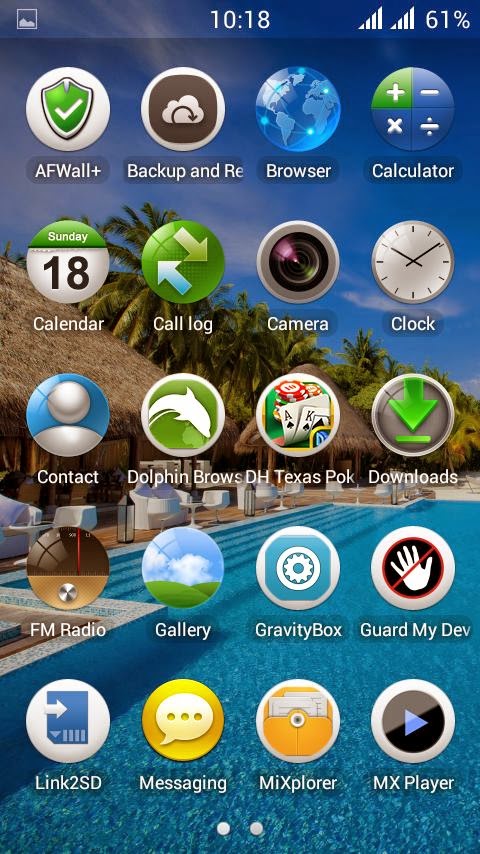
Lenovo Launcher For Wanton Primo F3 and F3i

All Things In 1 | Android Rom | Most popular source for Android news and reviews

WOODEN DESERT TRANSPARENCY ROM FOR Symphony W68

All Things In 1 | Android Rom | Most popular source for Android news and reviews

Upcoming Walton Primo X3 Blade(World's Slimmest Phone) Price in Bangladesh

All Things In 1 | Android Rom | Most popular source for Android news and reviews

Walton Primo HM Price In Bangladesh

All Things In 1 | Android Rom | Most popular source for Android news and reviews

Walton Primo R3 Price In Bangladesh

All Things In 1 | Android Rom | Most popular source for Android news and reviews

Showing posts with label MTK6572. Show all posts

Monday, July 7, 2014

Micromax Canvas 4 custom rom for Walton Primo H2

::::::: Procedure for Flashing a custom rom via CWM recovery :::::::


# Go to cwm recovery by pressing (power button+ volume down button)


# Select wipe/data factory reset >>> then select yes.


# Select wipe cache partition>>>then select yes.


# Then select mounts and storage>format/system>yes format


# Then select advanced option>>> then wipe dalvic cache and wipe battery stat.


# Then Return to the main menu again.


# Select Install from sd card > install zip from SD card > select custom Rom> yes.


# Then a process will occur.


# Wait untill it finished.


# Then reboot your primo H2
Rom Link:- [here]

Thursday, July 3, 2014

Xperia Z4 Custom Rom For Symphony w68


undefinedundefined

Feature :-

-Gamer ROM
-Mode Game+tweaked
-RAM 1Gb (fake)
-Internal Storage 3 Gb (fake)
-Super Smooth
-Camera 12 MP
-Auto Swap
-init.d
-busybox
-Xperia Home
-Walkman Music Widget
-Photo & Video widget
-Clock Widgets
-Xperia KeyBoard
-SomcNotes
-SomcSketch
-SomcXperiaLink
-Tasks
-Alarm & Clock
-Calendar
-Calculator
-SemcConverter
-Sony Select
-Socialife News
-TrackID
-Play Station Certificate
-Adjust All Background Color to Album Art on Walkman
-Music Control on Notification
-Walkman
-SoundEnhancement
-Clear Audio+
-Clear Bass
-Clear Stereo
-Dynamic Normalizer
-Surround Sound VPT
-Album
-Movies
-Friend Music FB
-Music Extension for find info on internet
-Bravia Engine 2 / X-Reality for Album & Movies (Only Actived on Album & Movies)


Download Link- [Here]
Password: w68zx

Saturday, June 28, 2014

Lenovo Launcher For Wanton Primo F3 & F3i


===================
Lenovo Launcher
===================
Tried to port the ROM but it is full of bugs.
I liked the launcher so much. That's why I tried to port the launcher and here it is
Screenshots are attached herewith the post. I have also included flashable zip of Lenovo Logo & Boot-animation. If you like the launcher then can flash this boot animation to get more perfect look of Lenovo phone.
Installation process: Simply flash through CWM/CTR
Download link:
Launcher: http://adf.ly/puEmk
Logo & Boot-Animation: http://adf.ly/puEo6
Enjoy !!!

Walton Primo F3 & F3i LG-Optimus ROM

Features Of This Rom:-
Look & Fell like LG Optimus
Better Battry Mangement
Much better ram management
Better Battery Management 

Added features:-
 Lenovo Camera with 13MP photo quality
Mi-Explorer instead of File manager
Walkman instead of default music
Acid Audio & Viper4Android added for super music quality  
Bugs :Front camera reversed  
Flash Camera Patch by Min Mostakim to resolve this 
Link: http://adf.ly/puFbw
But it will degrade camera to 8MP.
Instructions of using 13mp camera :Use lenovo camera to avail this quality. 
Open Lenovo camera and select options then select resolution to 13M (4096x3072) 
ROm Download Link: http://adf.ly/puFZe
If you wanna use LG Lockscreen then download it from:http://adf.ly/puFYP
I did not include this locker because it consumes over 20MB memory.
Install process of this rom
  1. Root your phone.for root: http://adf.ly/puFWr
  2. Install cwm recovery on your phone : http://adf.ly/puFVx
  3. Go to cwm recovery
  4. select wipe data/cache
  5. select wipe cache partition
  6. select advanced/wipe dalvik cache
  7. select advanced/wipe battery stats
  8. Mount nd Storage/Format system
  9. go back nd select install zip from sd card then chose the rom nd yes
  10. thats it nd wait some time
  11. 1st take some time to boot

  enjoy :)

Walton Primo F3 & F3i Nokia_X_ROM

Features Of This Rom:-

Look & Fell like Nokia  X

Better Battry Mangement

Much better ram management

Better Battry Mangement

Nokia X Boot logo nd animation

and much more

ROm Download Link:- http://adf.ly/phcgh

Fix Patch:- http://adf.ly/puFxN
Install process of this rom:-
  1. Root your phone.for root: http://adf.ly/puFWr
  2. Install cwm recovery on your phone : http://adf.ly/puFVx
  3. Go to cwm recovery
  4. select wipe data/cache
  5. select wipe cache partition
  6. select advanced/wipe dalvik cache
  7. select advanced/wipe battery stats
  8. Mount nd Storage/Format system
  9. go back nd select install zip from sd card then chose the rom nd yes
  10. thats it nd wait some time
  11. 1st take some time to boot

  enjoy

Walton Primo F3 & F3i Camera_sound_fix_patch

Dowload Link: http://adf.ly/puGc9

Walton Primo F3 & F3i GAME BOOSTER ROM

Rom Name: Game Booster
Size: 356mb.
Bugs: Front Camera  will be fix soon.

Features of this ROM:-

1. Duel sim 3G.
2. Pre Rooted.
3. Busy Box included.
4. Pop up box Fully transparent.
5. Transparent Status bar and notification bar.
6. Based on jellybean 4.2.2
7. System UI Desgined based on “Sony Xperia Z” and Samsung Galaxy S4 mixed.
8. Smart Air Gesture.
9. Play games without Ram Expander. Because It’s a gaming ROM :)
10. Latest Play Store Included.
11. Latest Super su included.
12. Best bettery backup yet.
13. Best Camera quality yet.
14. Smooth scroling.
15. Titanium backup, Mobileuncle tools, Lux dash, Root explorer added.
16. Awsome sound quality, Viper4android added.
17. Some xperia apps are included.

ROM download link : prothom 3 part 98mb kore and 4th ta 66mb.

Install process of this rom:-
  1. Root your phone.for root: http://adf.ly/puFWr
  2. Install cwm recovery on your phone : http://adf.ly/puFVx
  3. Go to cwm recovery
  4. select wipe data/cache
  5. select wipe cache partition
  6. select advanced/wipe dalvik cache
  7. select advanced/wipe battery stats
  8. Mount nd Storage/Format system
  9. go back nd select install zip from sd card then chose the rom nd yes
  10. thats it nd wait some time
  11. 1st take some time to boot

 Let's enjoy this awesome ROM